Menu reference / PC release · Oct 2026 footage
Selkie's Salvage&Co. Permanent Upgrade Menu
Already on the permanent upgrade menu? TP is the displayed upgrade balance and MAX marks bought-out entries. Hold the central GO control to start the next loop; the recorded restart begins at 0G.
Updated 2026-11-02 · PC release · Oct 2026 footage
First check: you are already on this menu
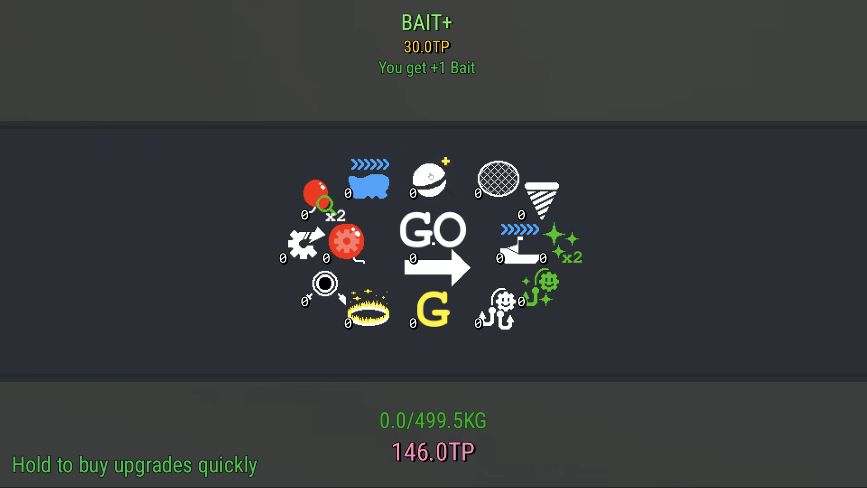
This guide begins at the ring of permanent upgrades. It does not cover how to reach your first NG+ menu. Look for the TP balance, the surrounding upgrade entries and GO at the center.
 Open full-size image ↗
Read the balance, cost and effect
The same October 29 recording shows the following three entries. These are recorded costs and descriptions, not a recommended purchase order or a complete upgrade list.
| Upgrade | Cost | Effect shown |
|---|---|---|
| BAIT+ | 30 TP | You get +1 Bait |
| Loaded Catch | 15 TP | Perfect catches also give double the load |
| Starter Magnet | 60 TP | Start your run with the Grinder Magnet |
MAX is the bought-out state
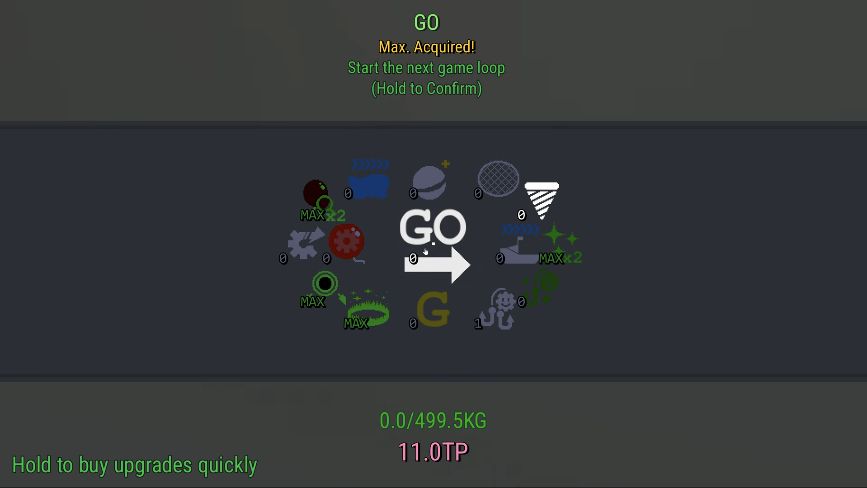
The recording shows BAIT+ and several other entries marked MAX after purchases, while TP drops from 146 to 26. Read MAX on the entry itself; a low remaining TP balance alone does not tell you that every upgrade is complete.
GO needs a hold, not a quick click
Point at the central GO control. Its tooltip says “Start the next game loop” and “Hold to Confirm.” Hold it to confirm. If a quick click did not start anything, check the on-screen hold instruction; the footage does not establish a fixed number of seconds.
 Open full-size image ↗
Recognize the restart
After confirmation, the recording returns to the ship cabin with 0G. That is the visible restart signal in this sequence; it does not prove that all resources or saved progress are erased.
Sources & scope
PC recording published October 29; exact build not shown. Costs and effects are transcribed from that recording.